Adjunct Faculty Email Signature
How We Look
To keep a consistent, branded way of communicating both internally and externally, please use the email signature template below. This is the default standard staff signature, which adjunct faculty can edit based on the formatting details below.
Signature Example
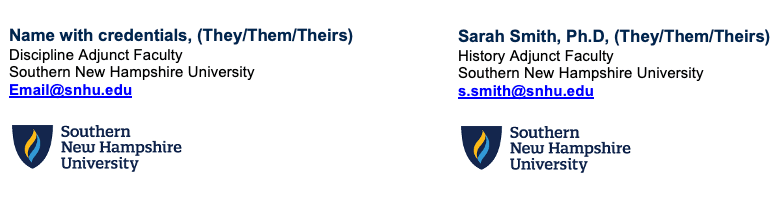
Example format: Name with credentials, (They/Them/Theirs) · Discipline Adjunct Faculty · Southern New Hampshire University · Email@snhu.edu
Download Email Signature Template
The same template is used for staff and adjunct faculty — edit it based on the formatting details below.
Instructions for Adding Signatures to Outlook
- 1Download and open the SNHU Branded Email Signature Template (do not copy and paste the image).
- 2Open Outlook → Preferences → Signatures.
- 3Select Add a signature.
- 4Copy and paste the content from the default signature in the Email Signature Template. When pasting into Outlook, you may need to right-click and select Keep Source Formatting.
- 5Remove any optional fields that you don't want.
- 6Update the generic fields with your information.
- 7Designate where the signature should be used (both for new emails and replies).
- 8Check that the font and formatting pasted in correctly (adjust per the formatting details below as needed).
System-Specific Signature Instructions
Formatting Details
- Avoid using handwritten signatures, quotes, or imagery/GIFs including badges.
- The Southern New Hampshire University logo should be the only logo used in your signature.
- If you do not have a department, please include a discipline.
- You do not need to include address, phone, or availability lines.
- You may include a phone number if you choose, but it is not required.
- Pronouns are optional. If you wish to add them, follow the formatting in the signature template. More details on pronouns are below.
Pronouns in Signatures
Sharing pronouns is one way to foster more inclusive spaces for students and staff. By providing an opportunity for people to share their pronouns, we show that we are not making assumptions about gender identity based on name or appearance alone. If you would like to share your personal pronouns, you can add them to your SNHU email signature to the right of your name — for example: (She/Her/Hers).